Editing & Proofreading
How track-changed suggestions keep the edit under your control
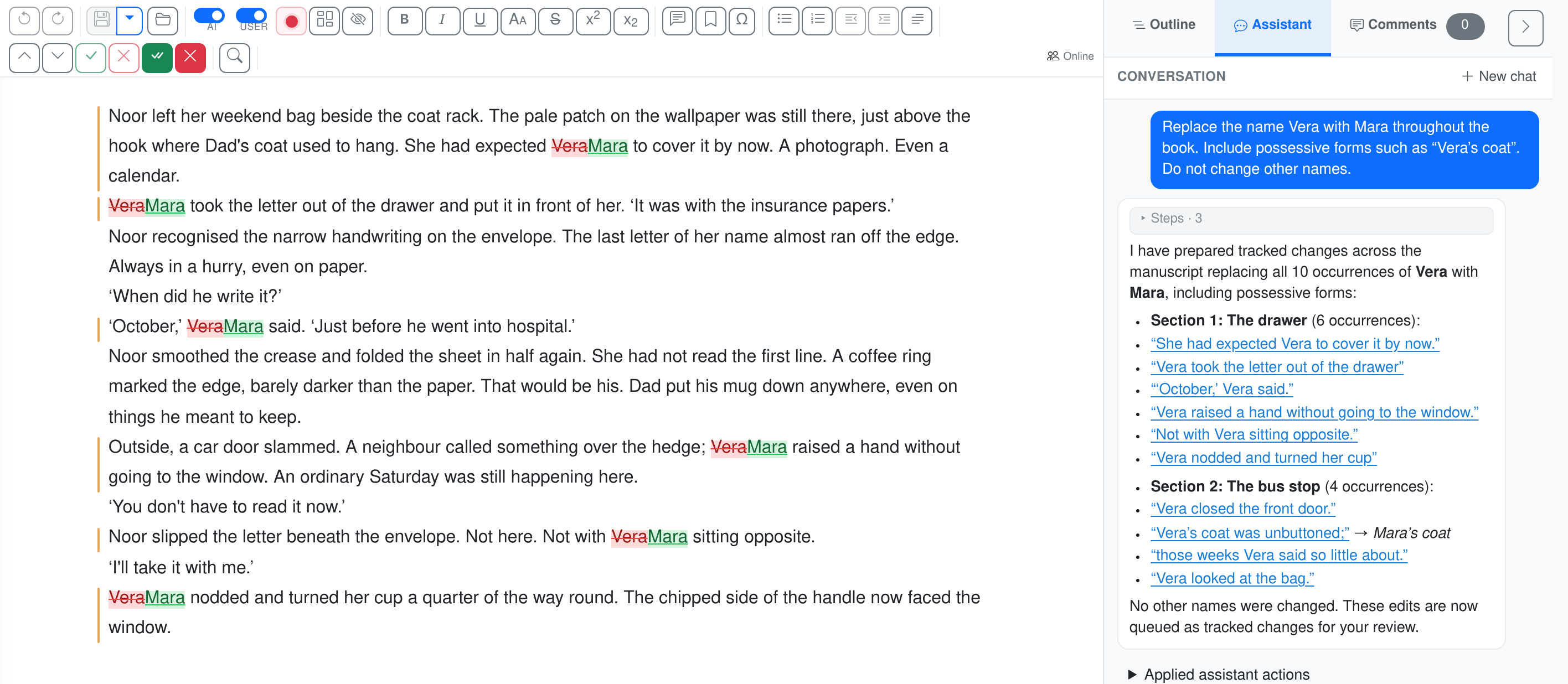
A name change across the book
A character has been renamed, but the old name still appears in earlier chapters. Give the assistant the instruction once, then review the passages it changes.
Replace Vera with Mara throughout the book, including possessive forms. Leave other names unchanged.
In short
A track-changes editor that helps improve the manuscript while keeping the author's voice reviewable.
- An editing plan you can add to, remove from, or rewrite before any text changes.
- Every suggestion lands as a real Word revision with an explanatory inline comment — accept, reject, or modify.
- Bulk-review groups recurring fixes (style, names, em-dashes, recurring corrections) for one-click accept or reject.
- A per-sentence floating AI-menu for targeted rewrites (length, formality, voice, dialogue naturalisation, and more).
- Export to .docx with all revisions preserved as real Word track-changes — open in Word, reviewable by anyone.
You have agreed on the direction with the author. Now those decisions need to find their way into chapters: a change in perspective, a scene that needs context, a name used inconsistently. Give the editing round a clear scope, or ask the assistant for a targeted change. Review the proposals in the text before accepting them.
Four editing levels, from light corrections to deep rewrites
EditBook.ai offers four editing modes, each with a different scope and philosophy:
- Copy-editing — spelling, grammar, punctuation, and basic sentence structure. The author's voice is preserved exactly as it is. The system corrects errors but does not improve style.
- Stylistic editing — everything in copy-editing, plus sentence flow, dialogue polish, clarity, and style improvements. The author's voice is preserved but enhanced — sharper phrasing, better rhythm, cleaner prose.
- Developmental editing — plot, story structure, character development, pacing, and tension. This mode works primarily through comments rather than text changes. It flags structural issues and suggests how to solve them, but leaves the rewriting to the author.
- Rewriting — full editorial freedom to restructure paragraphs, expand scenes, tighten arguments, and make substantive changes. The rewriting follows the editing plan, so the scope is controlled — but within that scope, the system rewrites freely.
On top of these four levels, there is a separate proofreading mode for a final pass. Despite the name, proofreading goes well beyond spelling and grammar. It enforces your style preferences: punctuation conventions (straight vs. curly quotes, ellipsis characters, dash styles), citation formatting, capitalisation rules, consistency of character names, duplicate sentences, and dozens of other issues that a standard spellchecker simply misses — all driven by an underlying style guide.
A style guide drives every correction
Every editing and proofreading pass is guided by a detailed style guide that defines the rules for the manuscript's language — punctuation conventions, spelling preferences, capitalisation, number formatting, quote styles, dash usage, and more. EditBook.ai ships with comprehensive default style guides for each supported language (based on Hart's Rules for British English, the Chicago Manual for American English, the Groene Boekje for Dutch, and equivalent references for other languages).
Publishers can override the default style guide with their own house style. In the organisation settings, you can provide your publisher's style rules — whether that's a specific quotation convention, capitalisation policy, or a full proprietary style sheet — and EditBook.ai will generate a customised style guide that the AI follows in every editing and proofreading pass. This means the system doesn't just correct to a generic standard; it corrects to your standard.
The style guide override is cumulative: your rules are layered on top of the language defaults, so you only need to specify what's different. If your house style agrees with the defaults on everything except quote marks and religious capitalisation, those two instructions are enough.
Every edit starts with a plan based on your analysis
Before EditBook.ai changes a single word, it generates an editing plan. The plan is derived from your analysis report (and from the author feedback document, if available). It translates the analysis findings into a concrete, numbered list of editorial actions — what to correct, what to strengthen, what to leave alone.
The plan is visible to you before the editing job starts. You can review it, modify it, remove items you disagree with, or add instructions of your own. This matters, because the editing plan is injected into every chapter's editing prompt — it's the instruction set the AI follows throughout the manuscript.
This means you stay in control of the edit. If the analysis flagged a pacing issue in chapters 8–10 but you disagree, delete that item from the plan and the system won't touch it. If you want a specific scene expanded, add it. The plan is the contract between you and the AI editor.
Voice preservation is a design constraint, not an afterthought
Every editing mode is explicitly instructed to preserve the author's voice. In copy-editing, this means the system will not rewrite a sentence for style — it corrects errors and nothing more. In stylistic editing, improvements are allowed, but the system is told to prefer consistency with the broader manuscript over local optimization and to avoid introducing prose that sounds noticeably different from the author's own.
Even in rewriting mode, where the system has the most freedom, the editing plan constrains the scope and the AI is instructed to maintain the author's established tone and register. The result should read like a better version of the same writer, not like a different writer.
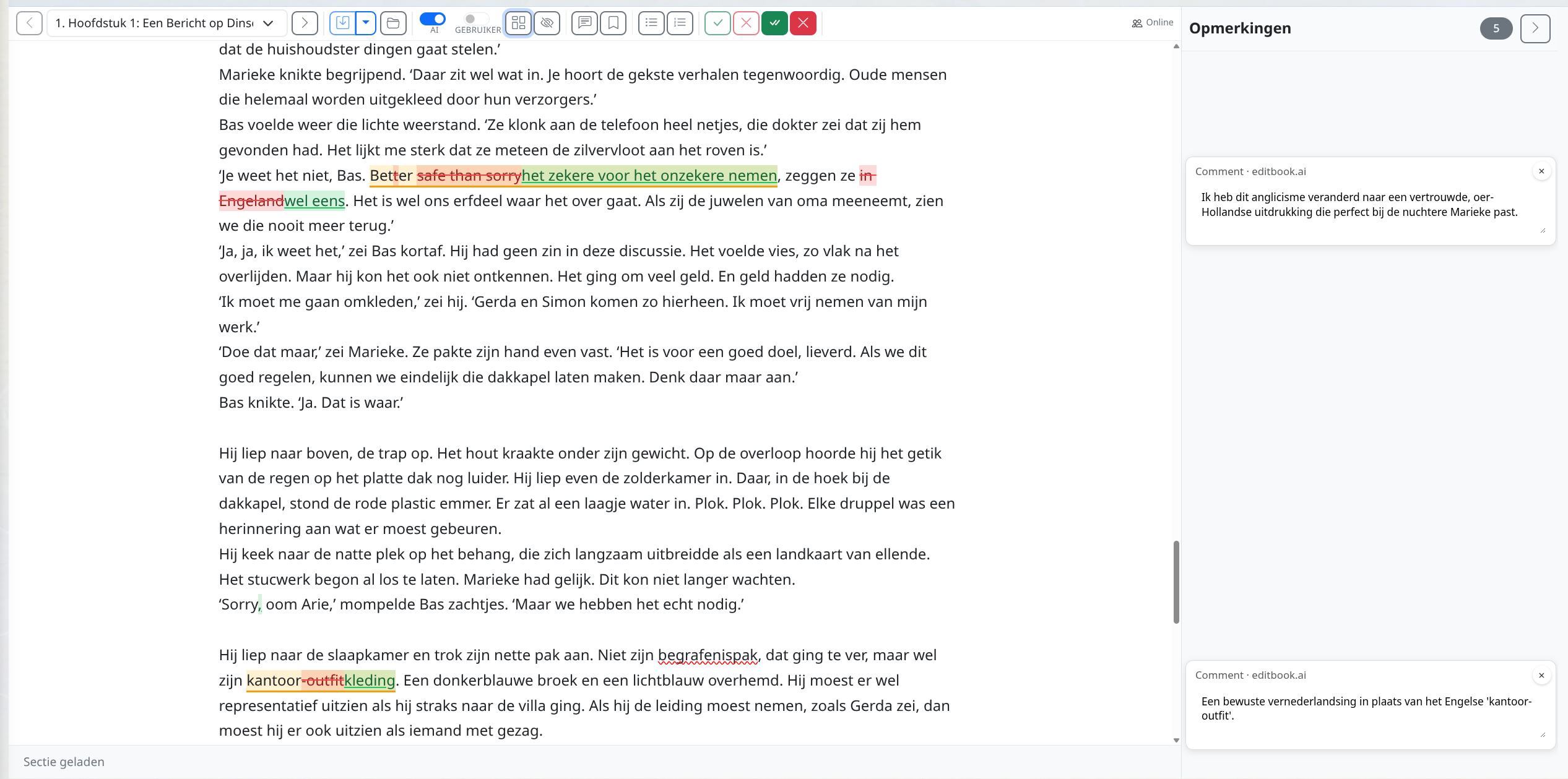
Comments explain what changed and why
Alongside text changes, the AI inserts inline comments to explain its reasoning. The nature and density of comments depends on the editing level:
- In developmental editing, comments are the primary output. The system flags structural, pacing, and character issues and explains how to address them, but makes minimal text changes itself.
- In stylistic editing, comments appear where the reasoning behind a change isn't obvious — a reworded sentence, a repositioned paragraph, a simplified construction.
- In copy-editing and proofreading, comments are reserved for ambiguous cases: possible factual errors, apparent gaps in the text, or passages that look out of place.
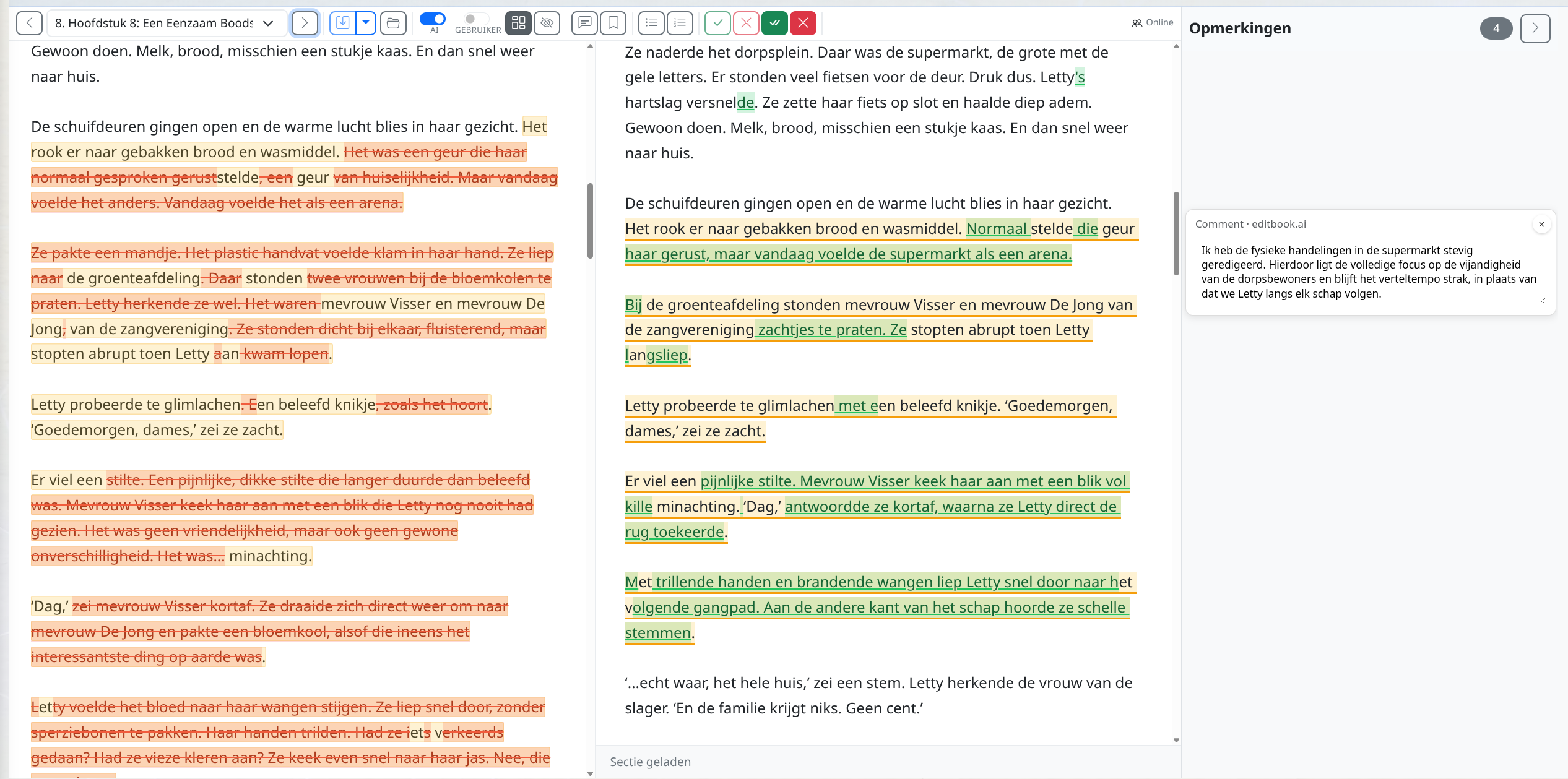
Comments show up in both the online editor and the downloaded Word file, so you can review them wherever you prefer to work.
Review changes before they become final
When the editing job finishes, nothing is committed yet. You get a change view that shows every insertion, deletion, and comment against the original text. From here, you have two ways to review and finalize the edit:
I. Common changes: batch review of recurring patterns
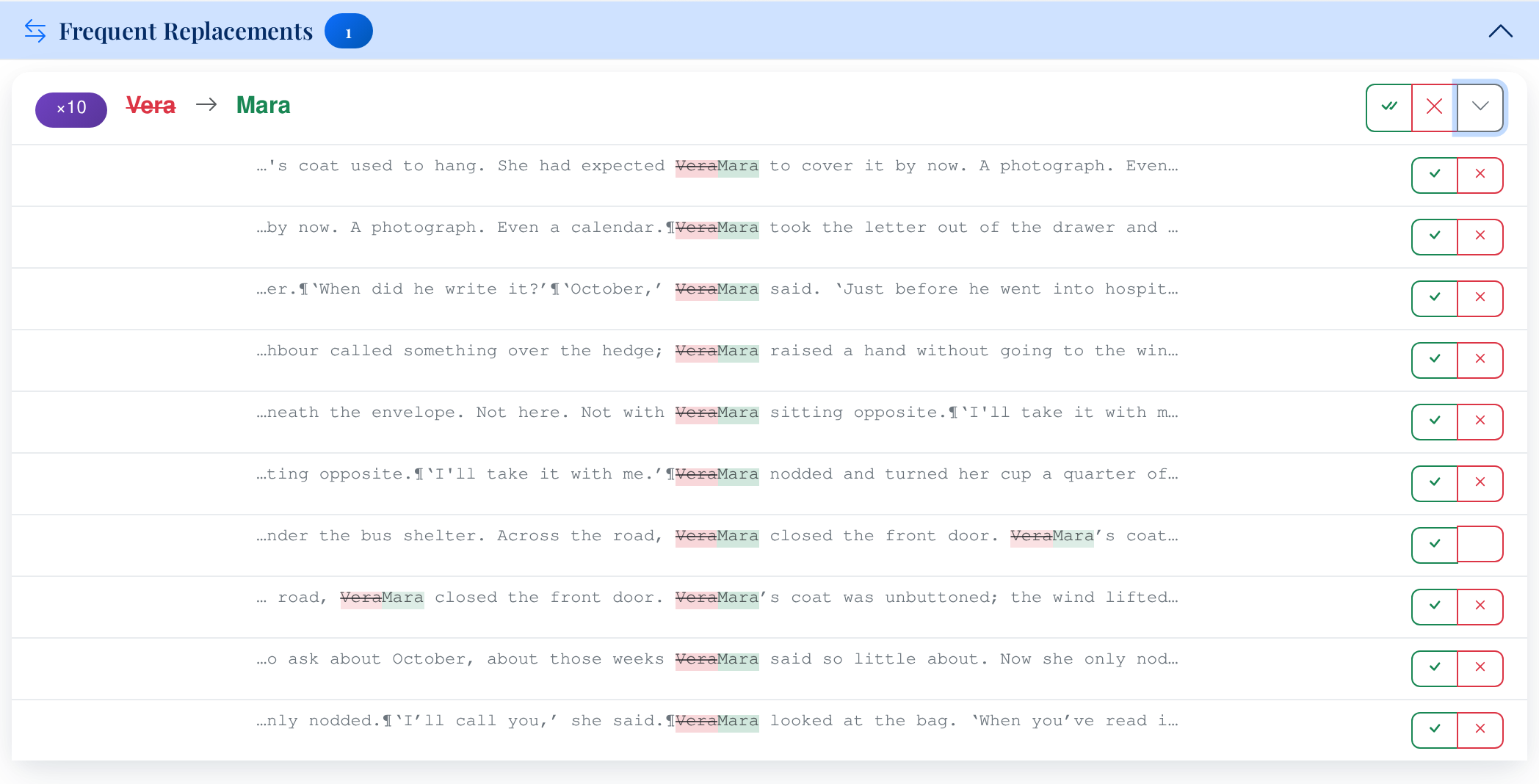
Before you go through the manuscript page by page, the system groups recurring changes for you. If the AI replaced every instance of "..." with "…", or consistently changed a comma splice pattern, those appear as a single group with an occurrence count. You can accept or reject the entire group in one click.
Changes are grouped into four categories: frequent replacements, frequent insertions, frequent deletions, and frequent comments. Reviewing these first lets you handle dozens of consistent corrections in seconds, so you can spend your time on the changes that actually require judgment.

II. Download as a track-changed Word file
If you prefer reviewing in Word, you can download the edited manuscript as a .docx file with full track changes. Every insertion, deletion, and comment appears exactly as it would in a Word document edited by a human colleague. You can accept or reject changes in Word, add your own edits, and return to your normal workflow.
The track-changes author name is configurable — you can set it to "EditBook AI" or to any name you prefer, depending on your workflow and whether the document will be shared with others.
III. Online editor: side-by-side review with live editing
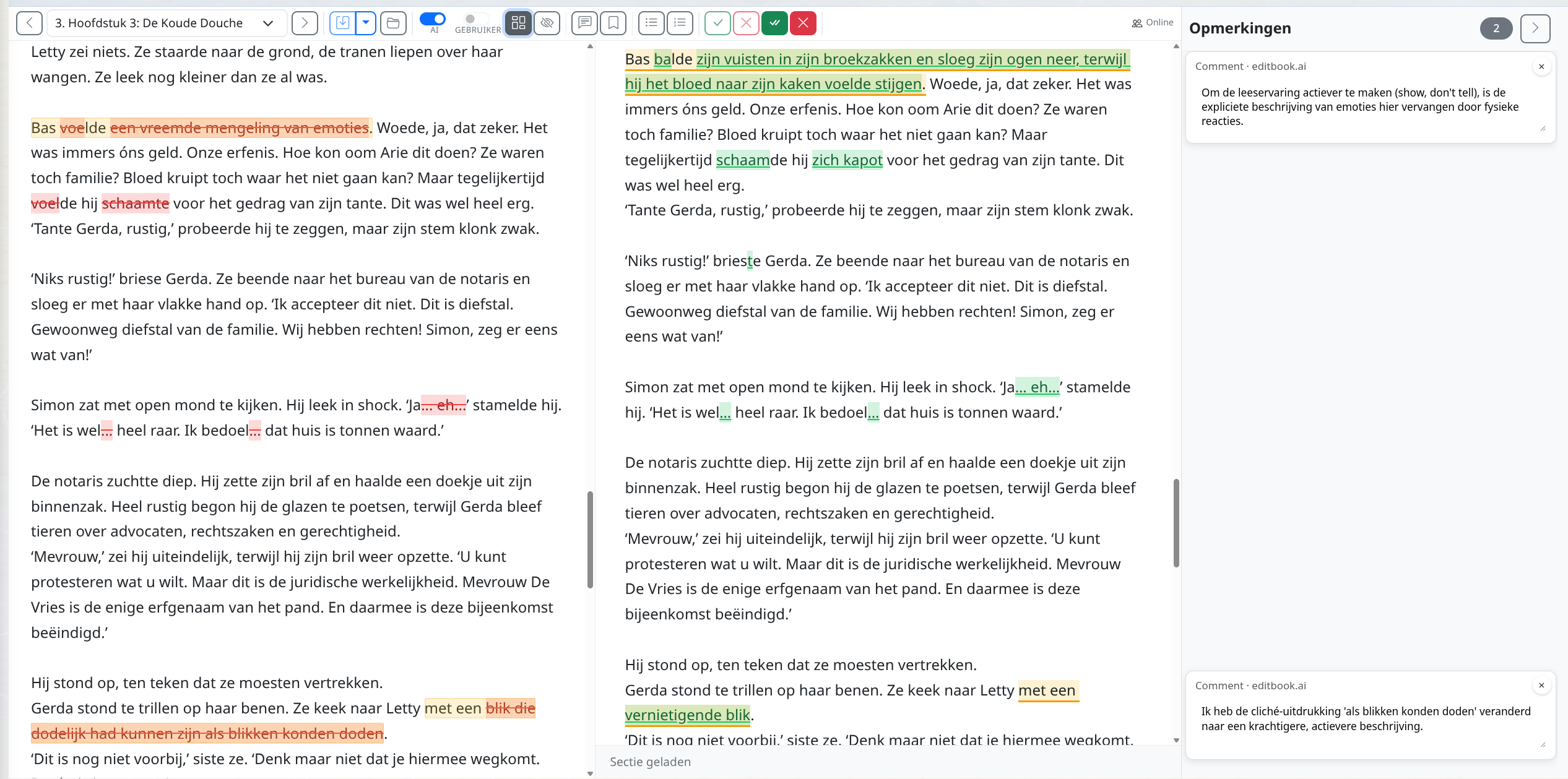
For a more interactive review, you can open the edited manuscript in the built-in web editor. This shows the edited text with all changes marked inline — insertions, deletions, and comments — and lets you accept, reject, or modify changes directly in the browser.
The editor works section by section, so you can work through the manuscript at your own pace. Your own edits are tracked separately from the AI's changes, so the final document reflects both the automated corrections and your manual revisions.
When you're done reviewing, you can download the result as a Word file — including your own changes as a second layer of track changes.
Multiple rounds: from structural edits to final proofreading
A manuscript rarely needs just one editing pass. EditBook.ai supports multiple rounds within the same project. A typical workflow might look like this:
- Run a stylistic editing pass — review and accept the changes you agree with.
- Run a copy-editing pass on the updated text — catch the remaining technical issues.
- Finish with a proofreading pass — a final, precise sweep for typos and formatting errors.
Each round creates its own set of tracked changes that you review independently. The project tracks the manuscript's state — first draft, editing, correction, final proof — so you always know where you are in the process.
You can also upload a new version of the manuscript into the same project at any point — for example, after you've reworked a section based on developmental feedback and want a fresh editing pass on the revised text.
Review the proposals in the author’s voice
A consistent change is not necessarily the right change for every passage. Look at what a sentence does in the scene or argument. Keep the useful revisions, reject those that flatten the text, and adjust the instructions when a pattern keeps recurring.
Ready to try it on a manuscript that needs attention?
See how structured analysis and track-changed suggestions support the editor's judgment.
New accounts currently open by invitation. Join the waiting list; you can view the examples without an account.