Why work on a book in EditBook?
A useful suggestion is the beginning. You still need to find the passage, judge the change in context, discuss it with the author and keep the right version. EditBook brings those steps into the same project.
A name change across the book
A character has been renamed, but the old name still appears in earlier chapters. Give the assistant the instruction once, then review the passages it changes.
Replace Vera with Mara throughout the book, including possessive forms. Leave other names unchanged.
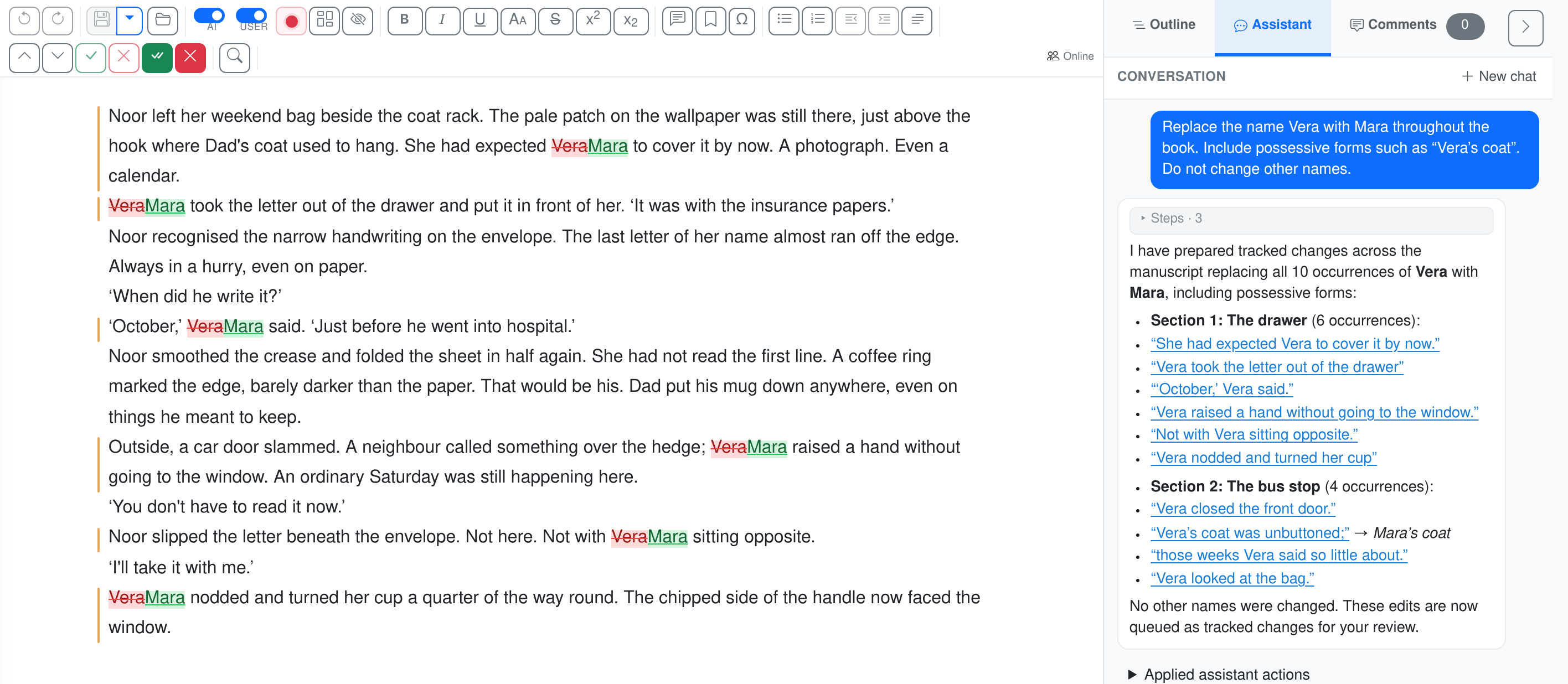
What EditBook prepares, and what you review
These are the practical questions to ask when choosing tools for a book. The division below shows how the work is organised in EditBook.
| Editorial task | Prepared in EditBook | Your review |
|---|---|---|
| Find revision priorities | A report with chapter summaries, observations and suggested next steps. | Check the evidence in the manuscript. Decide which observations matter to this book and its readers. |
| Give editorial instructions | An editable plan, with your instructions and style preferences available during editing. | Set the scope. Remove suggestions you disagree with and record what must be preserved. |
| Make a change across chapters | The assistant can find named passages and propose a set of tracked changes, as in the name-change example above. | Check exceptions and context. A repeated phrase may serve different purposes in different scenes. |
| Review recurring edits | Bulk review groups similar replacements and lets you open their individual occurrences. | Accept the pattern where it applies and handle exceptions individually. |
| Discuss a passage | Comments stay with the relevant text. The assistant can add a question or explain a proposed change. | Decide which questions to put to the author. Check that an explanation describes the actual change. |
| Receive another version | Forwarded author emails and attachments arrive in the workspace inbox with a proposed destination. | Check the project and manuscript attachment before accepting the proposed processing. |
| Hand the manuscript back | Export the text to Word with revisions and comments for further review. | Agree with the author which version is current and which changes are ready to accept. |
If you already use Word, a chat assistant or a translation tool, compare how each fits these steps in your own workflow. Features vary by product and plan. EditBook exports Word files with tracked changes and comments, so the author can continue reviewing in Word.
Working on a translation
Translation involves choices about meaning, rhythm, register and the reader’s knowledge. In EditBook, you can set those choices in an editable translation plan and terminology list before generating a draft.
Review the source and target side by side. Ask the assistant to comment where the meaning differs, then decide whether the difference is justified. The plan and the generated draft are material for your work; publication still requires a translator’s judgment.
View the translation plan and review workflowQuestions before you start
Will the author’s voice survive the edit?
Set the editing depth and say which stylistic features matter: sentence rhythm, dialect, repetition or an unusual narrative voice. Read several revised passages carefully. Reject changes that flatten the text and refine the instructions for the next round.
Does the report decide whether to publish?
The report helps you identify questions and plan editorial work. An observation can be wrong or miss what makes the book interesting. Acquisitions, artistic choices and the relationship with the author remain your decisions.
Must I run the whole workflow?
Start with the task you need: a report, a targeted assistant instruction or an editing round for selected chapters. Review the proposed scope and cost before starting AI work. You can return later without buying a new project licence.
Can I keep using Word?
Yes. The browser editor helps you inspect proposals and compare versions, and the Word export carries tracked changes and comments into the author’s familiar review process.
What happens to your manuscript
Your manuscripts are encrypted in storage in the EEA and during transfer. AI tasks send text to external model providers, without using it for model training. Processing is Global by default and may take place in the US; EU-Only mode keeps AI processing within the EEA. Read about privacy and processing
See whether it fits your next manuscript
The project licence and AI usage are priced separately. The pricing page shows the initial purchase and an example of the credits used.
New accounts currently open by invitation. Join the waiting list; you can view the examples without an account.