Mange nyttige redaktionelle spørgsmål kan ikke besvares ud fra ét afsnit. De afhænger af hele manuskriptet.
Indfrier slutningen det, åbningen lægger op til? Skiftede en persons forhistorie undervejs? Er tonen stadig konsekvent efter en gennemgribende redigering? Hvilke sætninger bærer stadig præg af engelsk efter oversættelsen?
At besvare den slags spørgsmål betyder normalt genlæsning, søgning, sammenligning og at stole på hukommelsen. Du kan prøve at gøre det i et generelt chatværktøj, men så skal du selv vælge, hvad du indsætter: hele manuskriptet, analyserapporten, de sidste to kapitler, et tidligere udkast eller en anden bog i serien. Hver gang spørgsmålet ændrer sig, skal du genopbygge konteksten.
I EditBook ligger manuskriptet og det tilhørende materiale allerede i arbejdsområdet. Chatten kan trække på kapiteltekst, genererede rapporter, tidligere uploads og beslægtede projekter, når et spørgsmål kræver det. Du stiller først det redaktionelle spørgsmål. Derefter læser, søger og sammenligner den det materiale, den har brug for, før den svarer.
Stil spørgsmål på tværs af manuskriptet
Start en chat fra manuskriptets arbejdsområde. Den kan trække på bogen kapitel for kapitel samt de rapporter, du har genereret: analyse, forfatterfeedback, noter om læseniveau, markedsrapporter og tidligere uploads.
Det nyttige er, at du ikke selv skal samle den pakke. Ved et kontinuitetsspørgsmål kan den for eksempel læse resuméet, tjekke feedbackrapporten, åbne kapitel 18 og 17, søge i manuskriptet efter Martha og derefter formulere et svar ud fra de kilder. Ved et spørgsmål om slutningen kan den sammenligne åbningens løfter med de sidste kapitler og den eksisterende analyse. Søgearbejdet foregår automatisk, og svaret viser, hvad det bygger på.
Det gør den nyttig til spørgsmål, du ellers selv skulle grave frem manuelt:
- »Slutningen føles flad. Hvad har bogen lovet, som slutningen stadig mangler at indfri?« Den ræsonnerer ud fra din bog, ikke ud fra generelle skriveråd.
- »Find steder, hvor tidslinjen, aldrene eller øjenfarverne modsiger hinanden.« Uoverensstemmelser ligger ofte kapitler fra hinanden, og det er netop derfor, de glider forbi en menneskelig læser.
- »Denne tekst er oversat fra engelsk. Markér sætninger, der stadig lyder engelske.« Anglicismer, oversættelseslån, ordstilling.
- »Hvad er der ændret mellem dette udkast og den forrige upload?« Den læser begge versioner og sammenligner dem.
Hvis bogen er en del af en serie, kan chatten også trække på beslægtede projekter: »Stemmer hovedpersonens forhistorie overens med, hvordan jeg fortalte den i bog ét?«
Den viser også, hvor den har kigget, så du kan verificere svaret i stedet for bare at tage det for gode varer.
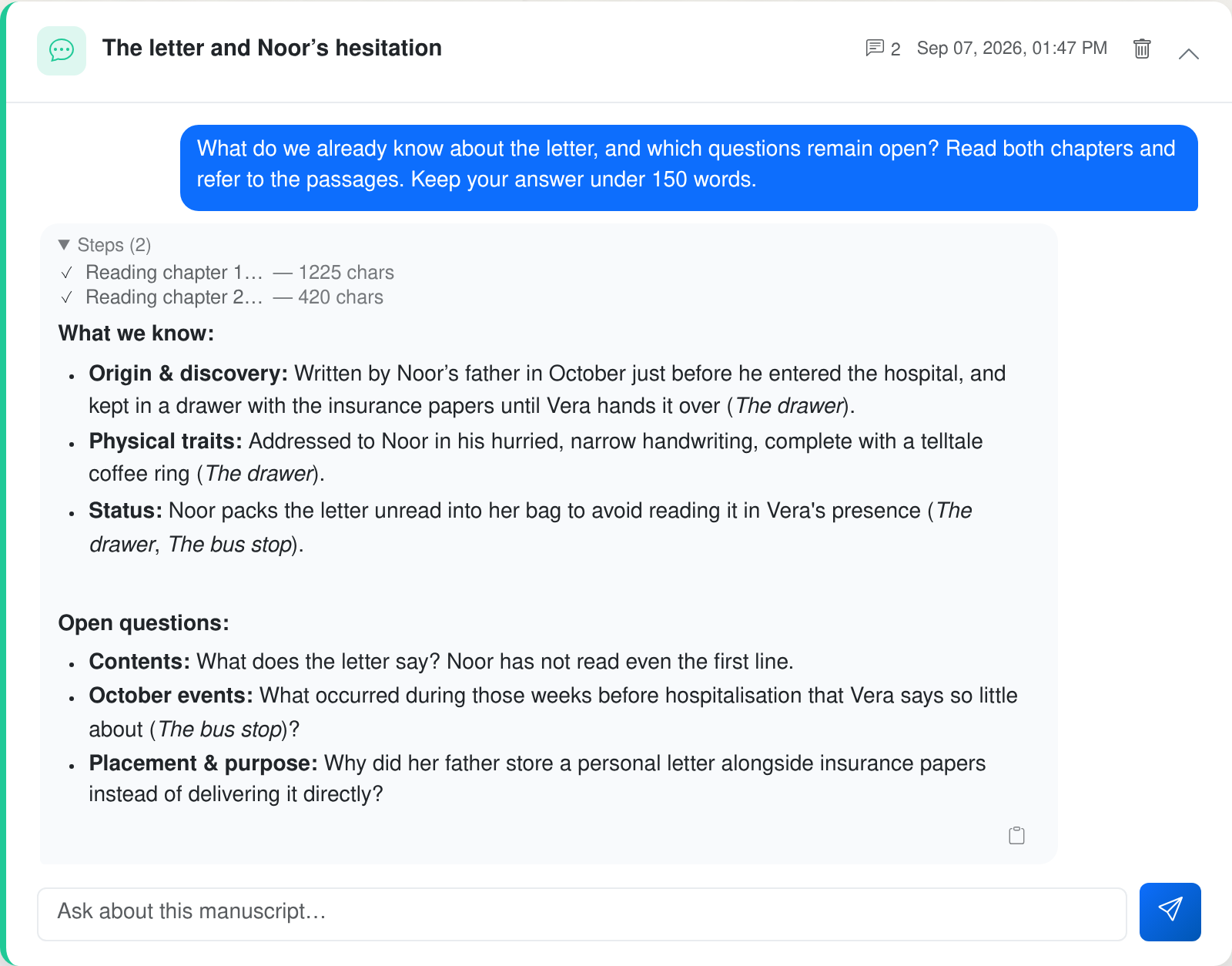
Et redaktionelt spørgsmål om en fiktiv scene. Over svaret kan du se de to kapitler, chatten læste. Manuskriptet er skrevet til denne demonstration; svaret kommer fra en faktisk forespørgsel til chatten.
Redigér genererede dokumenter
Nogle af EditBooks output er arbejdsdokumenter: udgivelsesplanen, feedbackbrevet til forfatteren, redigeringsplanen eller oversættelsesplanen. Åbn et af de dokumenter, og assistenten kan lave en mindre redigering direkte i udkastet.
- »Stram markedsafsnittet op, og tilføj én sammenlignelig titel.«
- »Uddyb dette afsnit af feedbackrapporten med eksempler på omskrivning.«
- »Tilføj en ›rør ikke‹-note til redigeringsplanen om dialekten i kapitel fire.«
Også her kan den kigge uden for det åbne dokument. Hvis du beder den om at uddybe et afsnit i forfatterfeedbacken, redigeringsplanen eller oversættelsesplanen, kan den søge og læse de manuskriptpassager, der er nødvendige for tilføjelsen, før den udarbejder ændringen. Redigeringen er målrettet, ikke en fuld omskrivning. Du kan se den foreslåede ændring, før du accepterer den.
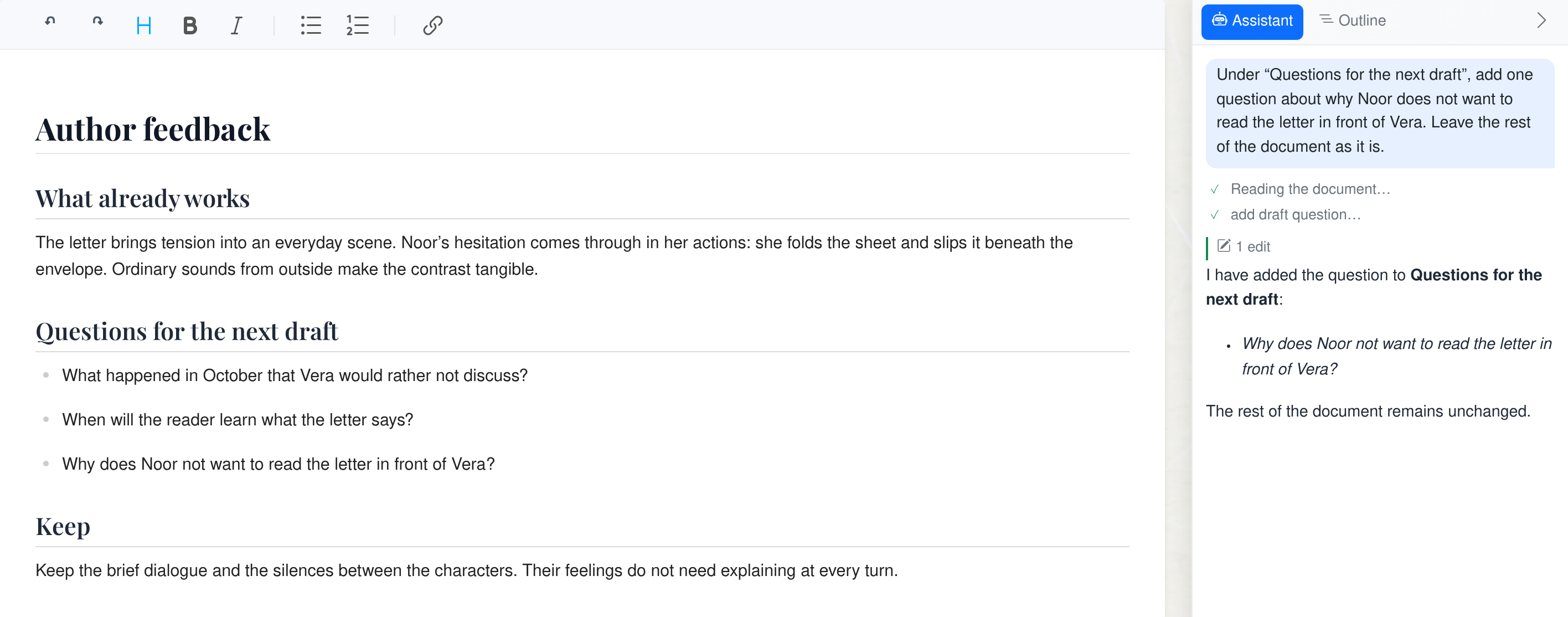
Assistenten har tilføjet ét spørgsmål til forfatterfeedbacken. Det foreslåede dokument står til venstre, og instruktionen og svaret står til højre. Resten af teksten er uændret. Dette arbejdsdokument er også skrevet til demonstrationen.
Hvor du finder den
Manuskriptchatten findes i arbejdsområdet. Dokumentredigeringsassistenten vises i dokumentvisningen ved genererede dokumenter. Åbn et genereret dokument, og klik på Assistant.
Dette indlæg beskriver versionen fra maj. Assistenten kan nu også redigere selve manuskriptet. Læs septemberindlægget om manuskriptassistenten.
Udgivet af EditBook.ais udviklingsteam. Vi skriver her, når vi lancerer noget nyt.