Translation
How literary translation works in EditBook
EditBook prepares the translation plan
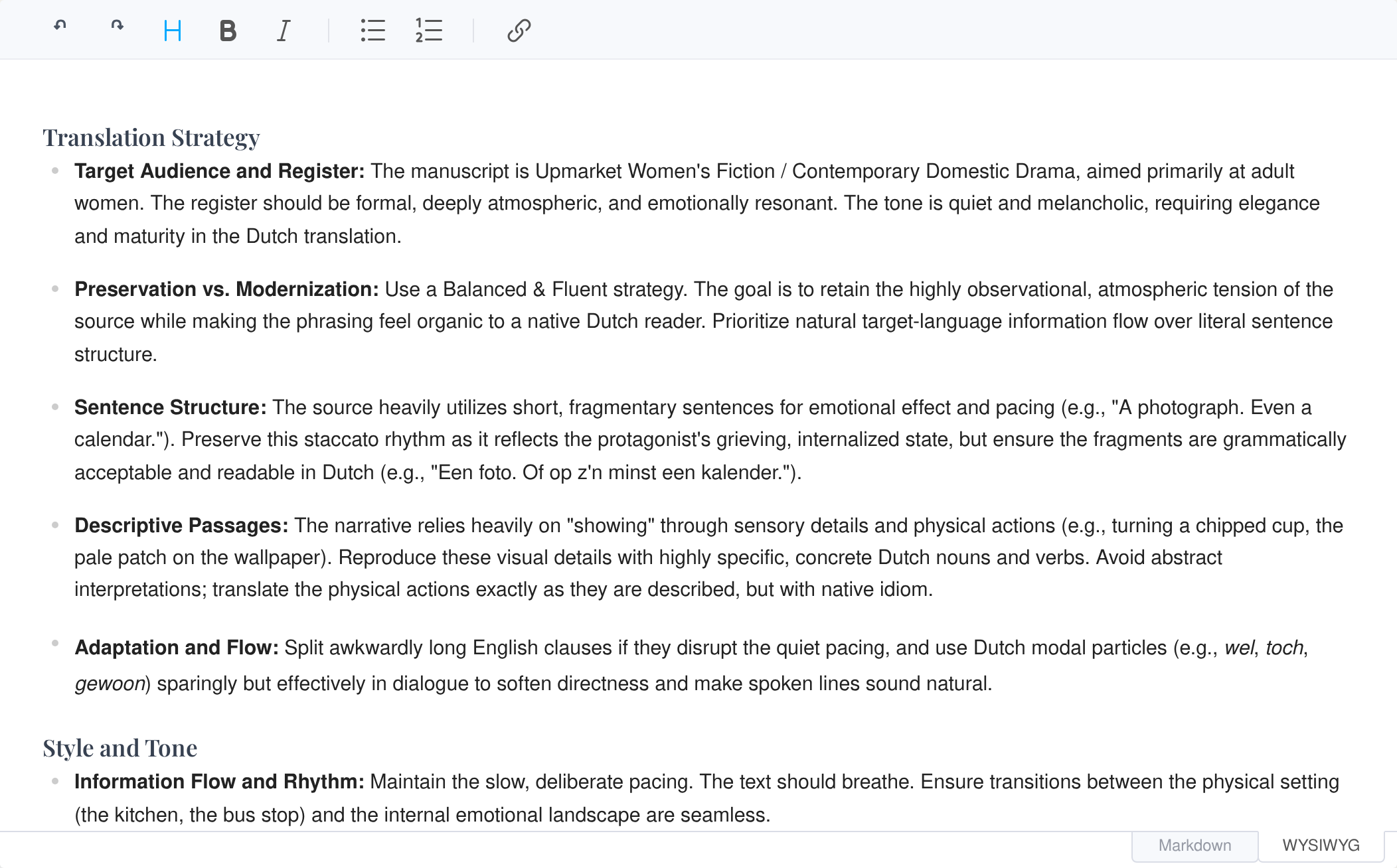
For this scene, EditBook has prepared a translation plan for the restrained dialogue, family relationships and recurring details. You can change the proposed instructions before translation starts.
What does EditBook.ai offer for translations?
A translation involves more than producing the next chapter. The plan, source comparison and editorial tools stay together in the project, so you can return to earlier decisions as the manuscript develops.
| Translation feature | In EditBook | A practical example |
|---|---|---|
| Analysis guides the translation | EditBook uses the manuscript analysis to guide the translation: story, voice, readership and cultural context inform the proposed choices. You can adjust those choices in the plan. | More context about historical institutions for readers unfamiliar with them. |
| Automatically prepared plan and glossary | A translation plan and glossary are prepared automatically from the manuscript and analysis. You can change them before translation starts. The agreed choices are used across chapters. | “Zwartewoud” for the estate and “Blackwood” for the family, recorded in the same plan. |
| Make the draft read naturally | A naturalisation plan guides revision of rhythm, dialogue and source-language interference, using the translation strategy and target-language style guide. | Keep deliberate repetition, while revising phrasing that follows the source syntax awkwardly. |
| Edit beside the source text | Edit the translation in a side-by-side editor where the source scrolls along with it. The AI translator’s automatic comments stay beside the relevant passages, so you can review its choices. | A comment explains why a reference was clarified for the intended readership. |
| An assistant for comparison and manuscript-wide changes | The assistant has the source and translation available together. It can compare them side by side, add comments and propose targeted changes in one chapter or across the translated manuscript. | Compare the dialogue between two characters with the source across all chapters, and propose changes where their relationship has shifted. |
| Continue with editing and proofreading | Run a separate editing or proofreading round on the translated edition, for the chapters and concerns you choose. | First work on dialogue rhythm; then check punctuation and house style. |
| Review and hand over the text | Review tracked changes in the editor and export the translation to Word with revisions and comments. | Let the translator or editor continue the review in the same Word file. |
EditBook uses the manuscript and analysis to prepare a translation plan with choices about readership, register and the author’s voice. As editor, you can adjust the proposed direction with the translator before translation starts.
EditBook prepares a translation plan and glossary as a starting point for your work. You can refine the proposed terminology, forms of address and register. Then edit with the source alongside the translation, review the AI translator’s comments and ask the assistant to investigate or revise passages across the manuscript.
The analysis provides direction for the translation
EditBook uses the manuscript analysis to take the story, characters, narrative voice, genre and readership into account when preparing the translation. Together with the source text, the analysis guides choices about register, cultural context and what should be preserved.
An edition for readers familiar with its historical setting may need different explanations from an edition for readers encountering that world for the first time. The proposed choices are recorded in the translation plan. You can change the readership, tone and approach before the translation begins.
A plan and glossary are prepared before translation
Before translation starts, EditBook automatically prepares a translation plan and glossary from the manuscript and analysis. The plan contains recurring names, terminology, forms of address and cultural references, alongside guidance on style, tone and individual chapters. You can change the plan and glossary, add instructions and record exceptions before the first chapter is translated.
Suppose Blackwood is both a family name and an estate. “Always replace Blackwood” would lose that distinction. The plan can instead specify “Zwartewoud” for the estate and “Blackwood” for the family. Each chapter receives the same reference, so a decision does not have to be rediscovered halfway through the book.
View the plan for the scene with Noor and the letter
Choose the target language and the degree of freedom before generating the plan. The five strategies run from literal translation through faithful-to-voice and balanced-and-fluent to dynamic-and-engaging and full adaptation. Use the plan to make that broad choice specific: which sentence rhythms, dialect features, cultural details and ambiguities should survive?
You can translate selected chapters first and continue later. Each run uses the saved plan at its start; changes to the plan guide future work. Check earlier translated chapters too when you change an important name or style decision.
From a first draft to a consistent translation
The selected chapters are translated using the plan, glossary and style guidance. The consistency check then compares the chapters translated in that round with each other and with the plan. It looks for variations in recurring terminology, forms of address, register and awkward phrasing carried over from the source language.
Its findings feed the naturalisation stage. A proposed terminology correction is considered in its sentence and scene, with room for a deliberate exception. This check concentrates on the translation and the plan; for a close comparison of meaning, use the source view and the assistant described below.
Naturalisation: rhythm and idiom, with the source at hand
After the draft, EditBook builds a naturalisation plan for the translated chapters. It combines the translation strategy, original plan, consistency findings and target-language style guide. That shared plan guides an editing pass on dialogue, rhythm, idiom and source-language interference. The source passage is available as a reference during this pass.
The naturalisation plan is generated and applied within the translation task. You set its direction through the translation plan, strategy and style guide; it is not a separate approval step. A literal strategy calls for restraint, while an adaptive strategy allows more reshaping.
The style guide sets conventions for the target language, such as punctuation, quotation marks and spelling. Workspace house-style rules can supplement it. Put book-specific choices in the translation plan: for example, keep a narrator’s abrupt sentences and a repeated image, while allowing the dialogue to follow the idiom of the target language.
Edit the translation with the source scrolling alongside
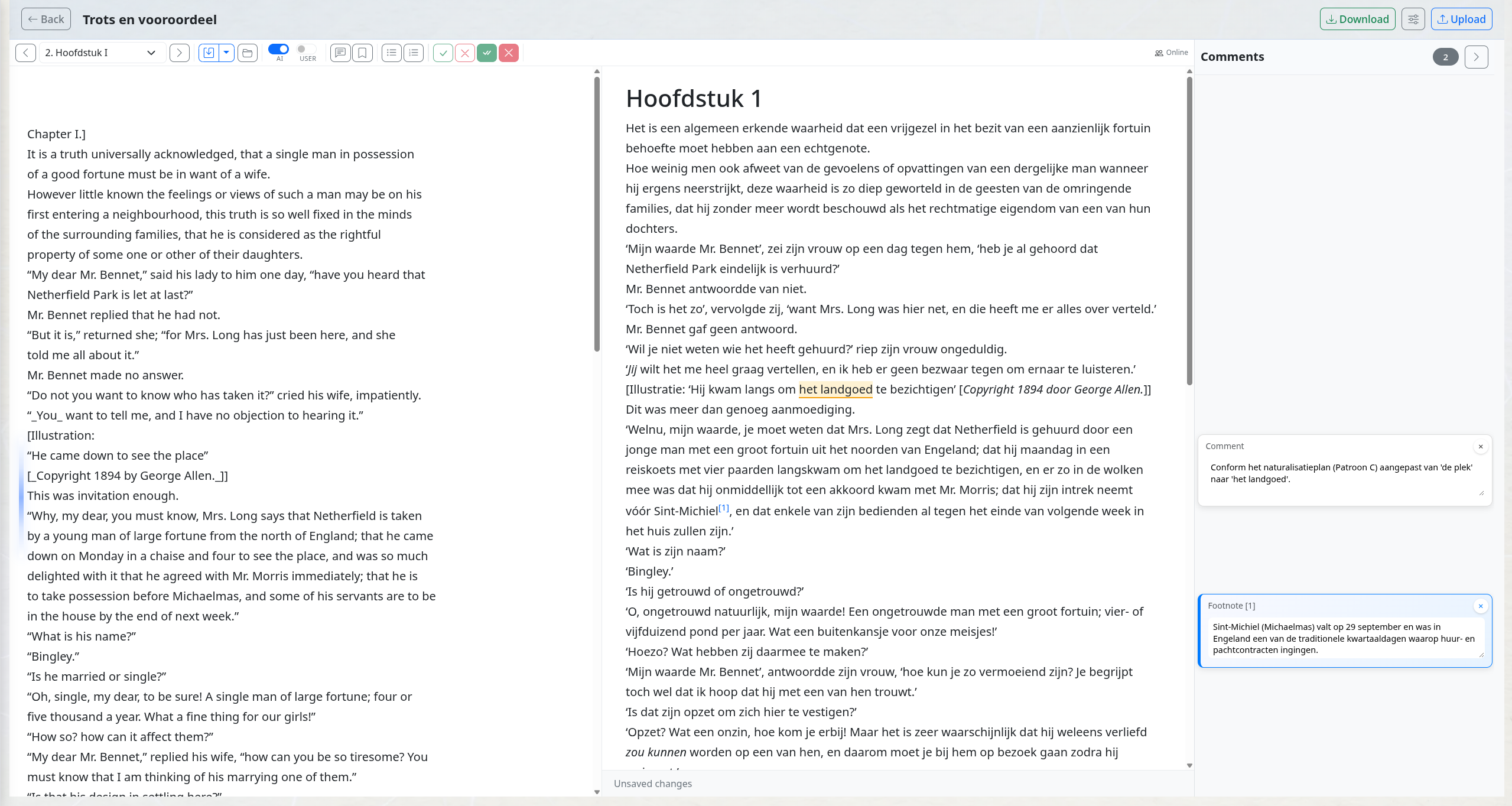
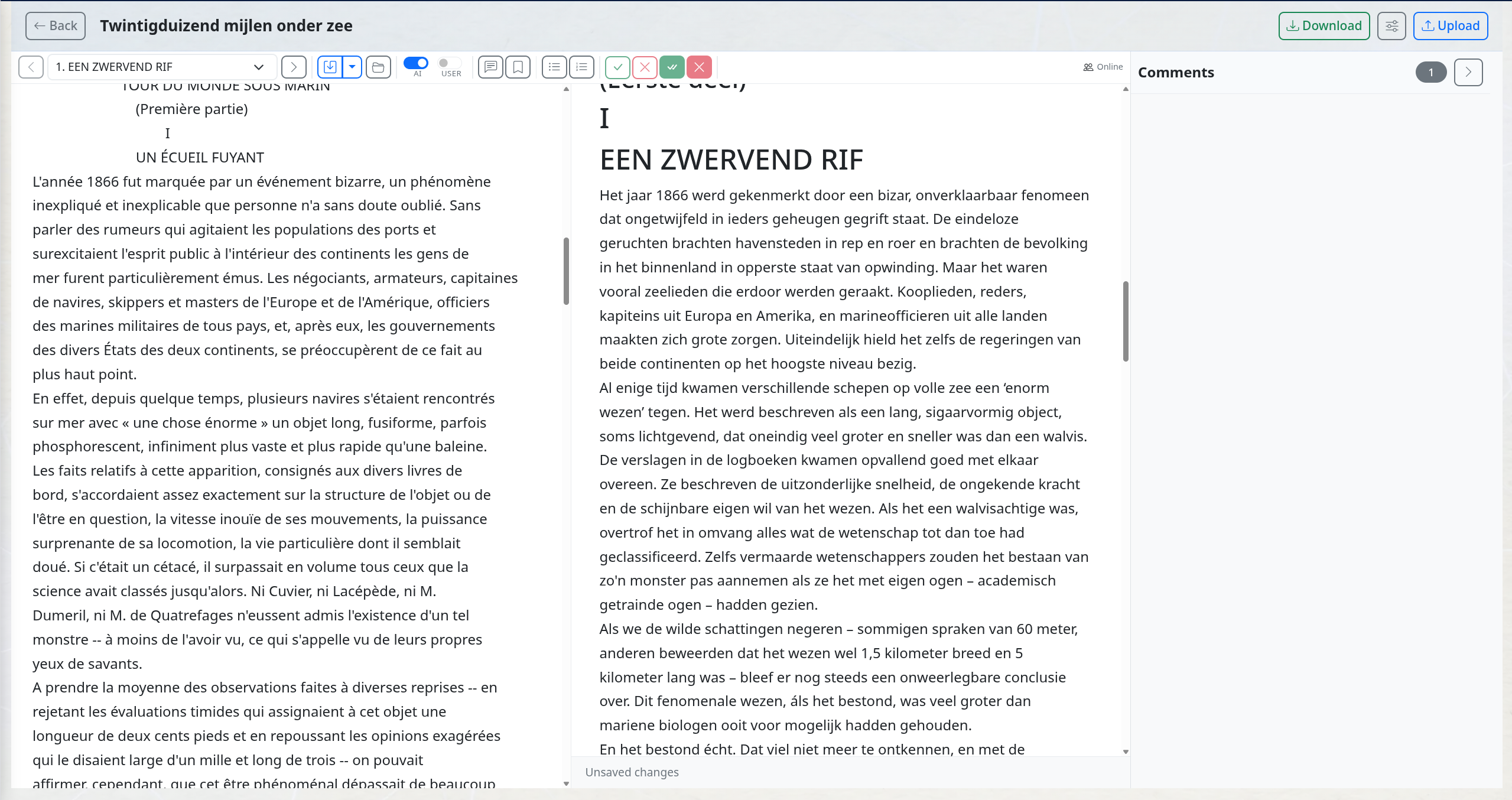
Edit the translation in a side-by-side editor where the source text scrolls along with the translation. The corresponding source passage stays nearby while you revise a sentence, compare a word choice or read a comment.
The AI translator’s comments are already attached to the relevant passages. They explain choices made during translation, such as clarifying a reference for the intended readership or adding context. Read the explanation beside the source and translation, then adjust the wording or discuss the choice.
An assistant for source comparison and changes across the manuscript
The assistant has access to the original source and translation at the same time. It can read them side by side, compare corresponding passages and propose comments or targeted changes. An instruction can cover one passage, several chapters or the whole available translated manuscript: for example, checking whether relationships between characters, tone or recurring names have changed.
Noor wondered whether Vera had read the letter.
Noor wist dat Vera de brief had gelezen.
The source leaves Noor in doubt. The draft turns that doubt into knowledge, changing the tension of the scene. This is the kind of difference you can ask the assistant to mark for discussion.
Compare this chapter with the original. Add a comment where information has been omitted, added or given a different meaning. Explain the difference briefly and leave the translation itself unchanged.
The comments appear at the relevant passages in the translation, where you and the translator can respond. If you ask for a rewrite, the assistant can propose tracked changes for you to accept or reject in context.
The assistant’s scope extends beyond the open chapter. You can ask it to find passages across the available translated manuscript, compare them with the source and work on a recurring choice. Name the scope and any exceptions in the instruction, so a useful book-wide change stays precise.
Find every place in the translation where the estate is called “Blackwood”. Propose “Zwartewoud” for those passages. Keep the family name and any quotations where the English estate name is deliberately retained.
Compare the dialogue between Noor and Vera in chapters 1 to 4 with the source. Where does their relationship sound more distant or more intimate in the translation? Propose a targeted change there and explain the choice.
You can also ask it to review meaning across all available translated chapters. Read its account of the passages examined and follow up where the question needs more attention. A focused instruction makes the results easier to assess than a general request to improve the book.
Automatic comments during translation
While translating, EditBook automatically adds comments to the text about ambiguous source wording, significant translation choices and details that need discussion. These comments are produced as part of the translation task and appear at the relevant passages in the delivered translation. Afterwards, you can discuss them with the translator or author, add your own questions or ask the assistant to investigate further.
Use a comment to discuss whether a cultural reference needs explanation. If that explanation belongs in the published text, it can become a footnote for the reader. Keeping those purposes separate prevents working notes from becoming part of the book by accident.
Use EditBook’s editing and proofreading tools on the translation
Naturalisation is part of preparing the translation. Afterwards, you can launch a separate editorial round on the translated edition within the same project. Choose the edition, chapters and editing depth, and use an editing plan based on the current translation to give that round a specific purpose.
For example, work first on the rhythm of the dialogue or an explanation that needs more context. Follow with proofreading for spelling, punctuation and style-guide conventions. The rounds operate on the selected translated text, and their revisions remain available for review.
Read how editing plans, review and proofreading work
Hand over the translation in Word
Export the translated text to Word with tracked changes and comments when it is ready for the next reader. The translator or editor can continue reviewing there.
The translation is yours to judge
A generated draft can contain a fluent sentence that changes the meaning, a misplaced register or a detail the source leaves open. Use the source comparison, terminology list and comments to examine those choices. Accept what works and rewrite what the book needs.
Ready to try it on a manuscript that needs attention?
See how structured analysis and track-changed suggestions support the editor's judgment.
New accounts currently open by invitation. Join the waiting list; you can view the examples without an account.