The comparison

"Why not just use ChatGPT, Claude, or Copilot in Word?"

A fair question. Generic AI assistants are excellent for brainstorming. They are not, however, built for the pressure editors and authors actually feel: keeping voice intact, making every change reviewable, and deciding what a manuscript needs next.

In short. A chat window gives you text. EditBook.ai gives you a Word file with tracked revisions, a structured first-read report, an editing plan you approve before anything changes, and a translation editor that holds terminology across a full book.
The short version

Three things a chat window does not give back

A workflow, not a chat

A multi-stage pipeline — analysis, plan, edit, review, export — where each stage produces a structured artefact you can keep, share, or come back to.

Real Word track changes

Every suggestion lands as a proper Word revision with an inline comment, so the author or editor can judge the change instead of pasting over the original and hoping the voice survived.

Your voice, kept on purpose

Voice preservation is a system-level constraint on every editing pass. You do not have to fight the prompt every time to stop the AI from rewriting you into its own house style.

See the difference

Same paragraph. Two very different outputs.

Take a stiff scene of dialogue. Ask a chat tool to "make it more natural." Then run the same passage through EditBook.ai's floating AI-menu "Naturalize dialogue" action.

Chat window — what comes back

A single block of new text

"Greg Tulliver. Aethon Health. Great to finally meet you." Sam shook his hand. His coffee was still in his other hand. "I've heard great things about this clinic. Dr. Patel speaks highly of your team." "That's nice of her." "When's a good time to sit down…" [...]

Now you copy it back into Word. Track changes shows: "entire paragraph replaced." The diff is unreadable, the author cannot see what actually changed, and the voice is harder to defend.

vs
EditBook.ai — what comes back

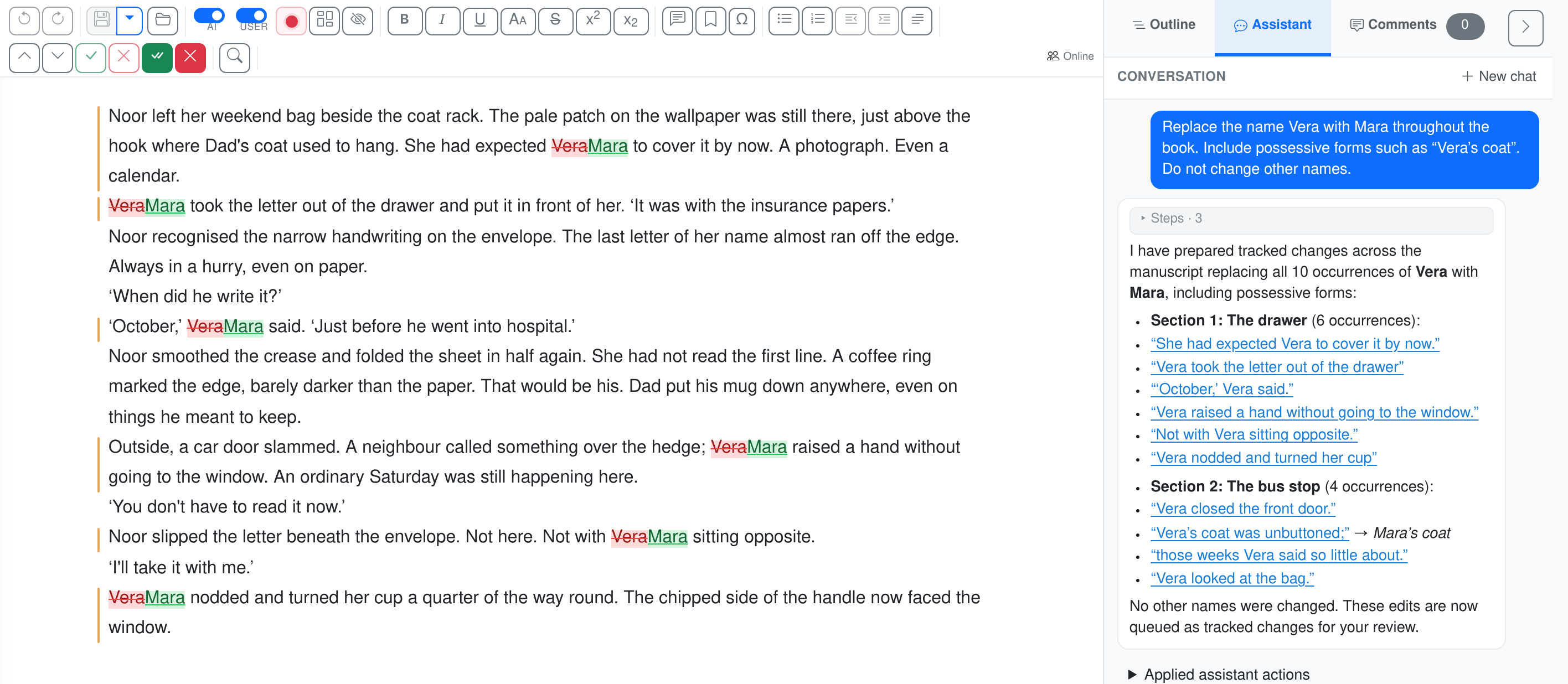
Sentence-level tracked revisions

The same dialogue passage shown with track-changes after applying Naturalize dialogue

Each move is its own tracked change — accept or reject independently. The diff tells the story of what the AI actually did to your prose.

Side-by-side

The detailed comparison

Grouped by what tends to matter most. Pick the section that maps to your concern.

1 · Quality & craft

Long-form work, voice, and terminology

What separates a tool that can edit a 90,000-word novel from one that can rewrite a paragraph.

EditBook.ai ChatGPT / Claude (chat) Copilot / Claude in Word
Long manuscripts (100k+ words)
Chapter-by-chapter pipeline with cross-chapter consistency passes
Hits context limits; you must copy-paste in chunks
Operates per-paragraph or per-selection; no cross-document memory
Voice preservation as a constraint
System-level instruction across every editing mode
Reverts to a generic AI register unless you re-prompt
Same — voice drifts under repeated suggestions
Literary translation with terminology consistency
Glossary extracted once, enforced across chapters; side-by-side editor with translator notes
Will translate any chunk you paste — terminology drift across chunks is your problem
Not a translation tool
2 · Workflow & artefacts

Structured outputs the work can hang on

Editorial work runs on documents — reports, plans, track-changed files, feedback letters. Chat boxes produce text in a window you eventually lose.

EditBook.ai ChatGPT / Claude (chat) Copilot / Claude in Word
Structured analysis report
Ten-axis review, audience fit, revision priorities — exportable PDF
Free-form prose answer; no persisted report
Not a feature
Editing plan you approve first
AI proposes a numbered plan, you edit it, then editing runs against your approved scope
You re-prompt for every change; nothing is enforced
You re-prompt for every paragraph
Real Word track changes
Every edit is a true Word revision with an explanatory inline comment
Plain-text suggestions; you reconstruct the diff by hand
Some suggestions land as comments; others overwrite text silently
Bulk-review of recurring corrections
Grouped patterns with accept-all / reject-all and per-occurrence drill-in
Repeats the same fix across paragraphs with no batch review
No grouped review surface
Author-ready feedback report
One-click export of a structured letter to the author
You write it yourself, summarising scattered chat outputs
Not a feature
3 · Practical

House style, pricing, and your manuscript's privacy

The procurement-team questions: what does it cost, what does it do with your text, and can it pick up your house rules?

EditBook.ai ChatGPT / Claude (chat) Copilot / Claude in Word
House style guide enforcement
Your publisher rules layered on top of language defaults — applied to every pass
Possible only if you re-paste the rules into every prompt
Not a feature
Pricing model
One-time per-project licence + pay-as-you-go AI credits
Monthly subscription whether you use it or not
Monthly Microsoft 365 add-on per seat
Data — used to train models?
Manuscripts contractually excluded from provider training; EU residency
Depends on plan tier; default consumer plans may train on your content
Depends on Microsoft/Anthropic settings at the tenant level
For translators

EditBook.ai vs. memoQ, Trados, and DeepL Pro

If you already work in a CAT tool, the question is not really "AI or no AI" — it is which tool fits the kind of translation you actually do. The pipeline differs more than the feature lists suggest; the table below makes both visible.

EditBook.ai
A staged editorial pipeline
Read the source Translation brief + glossary First draft, chapter by chapter Whole-book consistency review Naturalization editing pass Sentence-level revision rounds
memoQ / Trados
A translator IDE with QA add-ons
Manual TermBase setup Translate segment-by-segment Rule-based QA checks
DeepL Pro
A single-shot machine-translation pass
Translate (optional glossary)

The naturalization pass is the part that is hardest to see from a feature list and matters most for literary work: an auditor re-reads the full translated draft, flags terminology drift and recurring source-language interference, and a second editing pass works that into the chapters — calibrated to the brief you set at the start. A CAT tool leaves this layer to the translator. A single-shot MT skips it.

EditBook.ai memoQ / Trados DeepL Pro
Primary use case
Literary translation of a finished book — novel, memoir, non-fiction
Technical, legal, and commercial translation managed across agency workflows
Raw machine translation of any text, segment by segment
Source analysis before translation
Voice, register, period, narrator, and key terminology extracted from the source first
Not a feature — the translator brings that context themselves
Not a feature
Strategy on a literal ↔ adaptation scale
Five-point setting applied across the whole book; every revision honours it
Implicit in the translator's choices; no system-level setting
No equivalent — output style is fixed per language pair
Cross-chapter terminology consistency
Glossary extracted from the source once, enforced everywhere — including in your manual revisions
Strong: TermBase + segment-level enforcement is the CAT-tool sweet spot
Glossary feature exists but is shallow — term-by-term, no extraction
Side-by-side editor with source ↔ target sync
Free-flowing document view: source and target read like prose, kept in sync at the sentence level. Click a sentence in either pane and the other highlights.
Segment-by-segment grid — each source segment in a row next to its target. Robust for technical work; for literary prose the rigid alignment can fight against natural sentence-splitting.
Segmented two-pane editor in the Pro document tool. Comparable shape, less editorial control over the alignment.
Translator comments on the text
Inline sentence-level comments — visible next to the passage, exported to Word as proper Word comments.
Per-segment comments are standard. Display lives in a side panel rather than inline with the prose.
No collaborative comment layer in the document editor.
Footnotes (literary translator essential)
Footnotes attach to a sentence; the translator adds, edits, and renumbers them inline — preserved on export.
Awkward: footnotes are usually represented as inline tags or extracted as separate segments. Translators routinely work around this.
Footnote markers in the source are preserved on output, but there is no first-class footnote-authoring surface for the translator.
Translation memory (TM) reuse from prior books
Not yet — TMX import is on the roadmap.
Industry standard. Fuzzy matches across years of past work are the core CAT value prop
No TM — every translation is from scratch
File formats
.docx in, .docx out — with Word track changes on the translated draft
XLIFF, SDLXLIFF, .docx, many more — built for agency pipelines
.docx, .pdf, text — but output is finished, not a marked-up file you can review
Pricing model
One-time per-project licence (Studio tier) + pay-as-you-go AI credits
Perpetual licence (€700+ for individuals) plus annual maintenance
Monthly subscription per user, or per-character API pricing
Best for…
Literary translators producing publication-ready drafts of books, with voice and terminology that hold across the manuscript
Translators working at scale across many short projects, where TM and segment metadata pay off
Anyone wanting a fast machine-translation pass to post-edit themselves

Put another way: a CAT tool is most at home when you live in your translation memory. EditBook.ai is most at home when each book is read on its own terms and the voice has to hold from chapter one to chapter forty.

Questions, answered

The objections we hear most

What we have heard from authors, editors, and translators we have spoken to — and what we tell them in reply.

"I already pay for ChatGPT Plus / Claude / Copilot. Why pay again?"

Those plans are flat-rate subscriptions you pay every month regardless of usage. EditBook.ai is a one-time licence per manuscript with credits you use only when you run a task. If you only do one or two manuscripts a year, that is dramatically cheaper. And the artefacts — analysis report, editing plan, track-changed Word file, side-by-side translation — are not artefacts you can get out of a chat box at all.

"Copilot is built into Word. Same thing, isn't it?"

Copilot edits the document you are looking at, paragraph by paragraph. It does not analyse the manuscript structurally, does not produce a full editorial report, does not enforce a house style guide, does not group recurring fixes, does not produce an author feedback letter, and does not translate with terminology consistency. It is a writing assistant; EditBook.ai is an editorial pipeline. They are different categories of tool.

"I am worried AI will flatten my voice."

So are we — and so is every author we have ever spoken to. EditBook.ai treats voice preservation as a hard constraint, written into every editing pass at the system level. The system is also explicitly told to prefer consistency with the rest of your manuscript over locally-optimal phrasing, and every change shows up as a track-change you can reject. The result reads like a better version of you, not like a different writer.

"My manuscript is sensitive. What about confidentiality?"

Manuscripts are encrypted at rest and in transit. AI providers are contractually bound to exclude your content from model training. Data is held in EU data centres. You can delete a manuscript at any time and it is gone — including from backups, within our defined retention window.

For your legal team

What happens to your manuscript

Encrypted, not training data

Encrypted in transit and at rest. AI providers contractually excluded from training on your manuscript. EU data residency available via EU-only mode.

GDPR-compliant, DPF-routed

Primary storage in the EEA. International AI transfers covered by the EU-US Data Privacy Framework and SCCs. Standard DPA available on request.

Yours to delete

Delete a manuscript at any time and it is gone — including from backups, within our defined retention window. Your data, your call.

Read the full privacy & security policy  ·  Terms of service

See for yourself on a real manuscript

Start with a single project licence — no subscription, no per-seat cost. You only pay for the AI tasks you actually run.