
The assistant in the editor can work beyond the open paragraph. You can ask it to find and edit passages throughout the book, or add comments to text you want to examine more closely.
In May, we wrote about asking questions across your book. That chat could already consult manuscript material and edit generated reports. The assistant in the editor can now work on the manuscript itself. Here are four examples of instructions you can give it.
Annotate differences in a translation
When reviewing a translation, you need to find places where the meaning has shifted. A qualification may have disappeared, a character may sound more certain, or a detail may have been added.
Compare the translation with the original. Add a comment to passages where the meaning differs, information is missing or something has been added. Explain the difference in each comment. Leave the translated text as it is for now.
The assistant can consult the source and translation side by side and attach comments to the relevant passages. You can then judge whether each difference is a deliberate translation choice or needs an edit. That discussion stays with the text, including when you share it with the translator.
Rename a character throughout the book
A character gets a new name during editing. You want the mentions in earlier chapters updated too.
Replace the name Vera with Mara throughout the book. Include possessive forms such as “Vera’s coat”. Do not change other names.
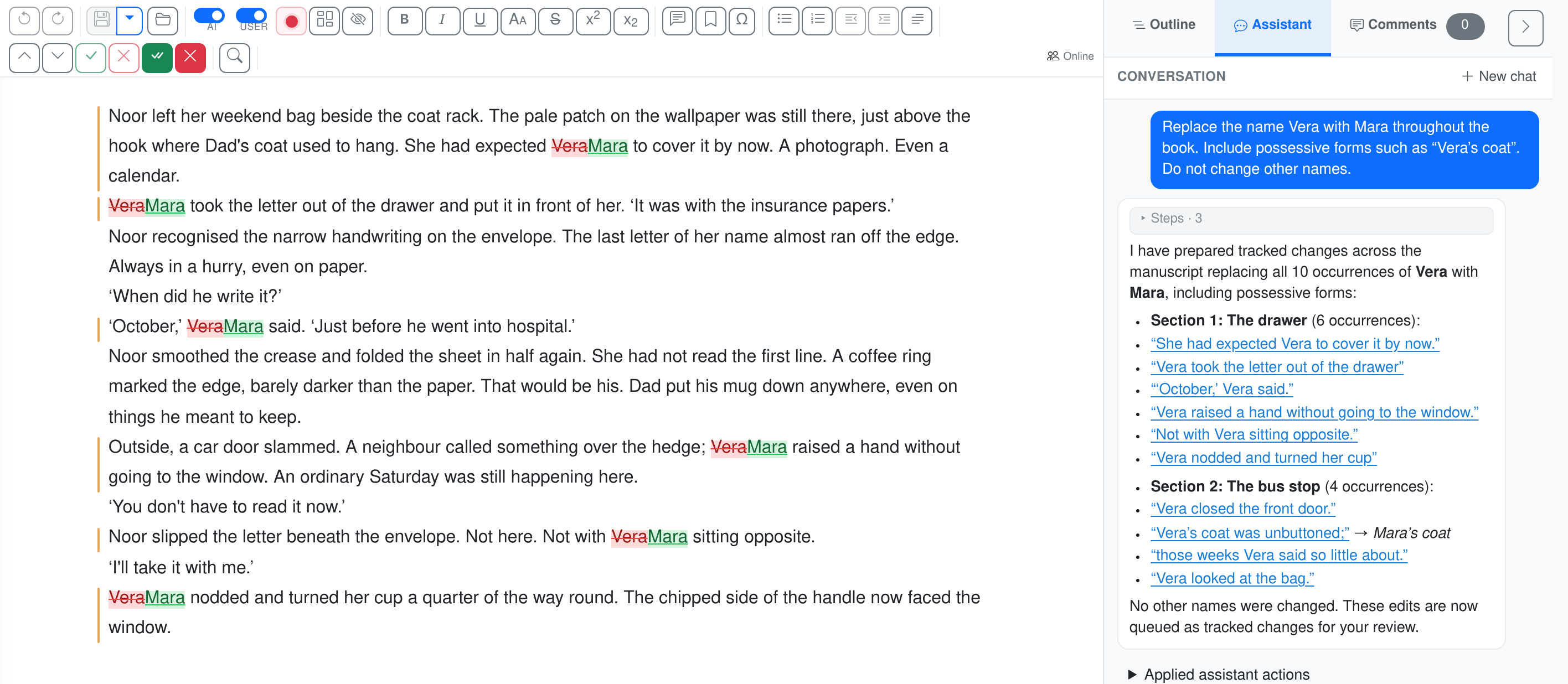
The name changes appear in the text on the left. On the right, the assistant reports ten replacements across two chapters, including “Vera’s coat”. The manuscript text was written for this demonstration.
The assistant finds the mentions and can prepare replacements across the chapters. You can review the changes where they occur in the text. The same kind of instruction works for an organisation that has been renamed or a term that needs to be used consistently. Include any exceptions in your request.
Move the story from a village to a busy city
A change of setting affects many passages at once. How far apart do the characters live? Where do they run into each other? What can they hear through an open window?
Set the story in a busy city instead of a village. Update the setting throughout the book, including transport, distances, meeting places and background noise. Keep the main events and the relationships between the characters.
The surroundings need to make sense in the characters’ actions too. A chance encounter with an acquaintance in the village square may need a different setup in a large city. You can discuss what sort of city you have in mind and which scenes should retain their character. Ask the assistant to find the affected passages and propose edits, then work through what still needs adjusting.
Make difficult passages easier to follow
An argument may skip a step that seems obvious to its author. In a novel, a character may act on information the reader hasn’t been given. Ask the assistant to find those places and improve the explanation.
Identify passages that are difficult to follow and edit them so the reader can follow the reasoning or action more easily. Explain what was missing in a comment beside each change. If you need information from the author, leave a question rather than inventing it.
Say who the book is for. A specialist needs a different level of explanation from someone encountering the subject for the first time. You can also limit the request to a chapter where you’ve already noticed problems with the explanation.
Work through the proposals
You choose when the assistant should ask for confirmation before applying changes: always, only for substantial edits, or never. Applied text changes remain visible as revisions for you to review, accept or reject. Comments stay with the passages they refer to.
You can carry on in the same conversation: “The city feels busy enough now, but the walk to the station should still be a quiet moment. Have another go at that passage.” An editorial instruction doesn’t have to produce the right result on its first attempt.
Open a chapter or translation in the editor and choose Assistant in the sidebar. Say whether your request concerns the selection, a chapter or the whole book.